Friday, 27 March 2020

Deals: Huge Refurbished iPhone Sale Discounts iPhone 7, 8, X, XR, and XS (From $120)

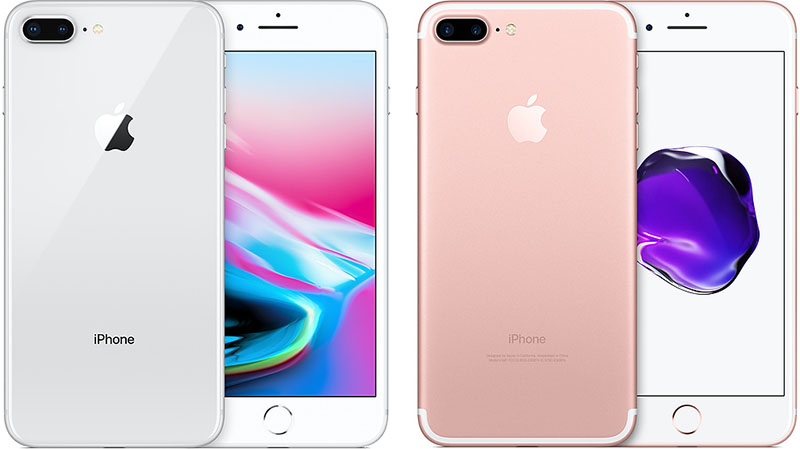
Woot is back today with a big sale on refurbished iPhones, including markdowns on the iPhone 7, iPhone 7 Plus, iPhone 8, iPhone 8 Plus, iPhone X, iPhone XR, iPhone XS, and iPhone XS Max.

Note: MacRumors is an affiliate partner with Woot. When you click a link and make a purchase, we may receive a small payment, which helps us keep the site running.

As with every Woot purchase, those interested in the iPhone sale today should note that these devices are expected to have a moderate level of wear and tear that could mean scratches, dents, and dings. But, besides their physical appearance, each iPhone has been tested to be in full working condition, and batteries are tested to function at minimum 85 percent capacity.

Sales start with the 32GB iPhone 7 at $119.99 and the 32GB iPhone 7 Plus at $189.99. In the United States, the iPhone 7 launched at a price of $649 for 32GB and the iPhone 7 Plus started at $769 for 32GB, so these are savings of up to $580.

The iPhone 8 discounts start at $209.99 for 64GB, while you can get the iPhone 8 Plus for $299.99 for 64GB. Back in 2017, the iPhone 8 started at $699, while the iPhone 8 Plus started at $799, representing markdowns of up to $500 for these iPhone models.

You can get a 64GB iPhone X for $359.99, while the 64GB iPhone XR is $399.99. Lastly, the newest iPhones on sale today are the iPhone XS family, and you'll find the 64GB iPhone XS for $449.99 and the 64GB iPhone XS Max for $559.99.

Every iPhone on sale at Woot has even more storage capacity options and color choices as of writing, so be sure to head to Woot's iPhone sale page before stock dwindles. The sale will officially end tonight at 12 a.m. CT.
Related Roundup: Apple Deals

This article, "Deals: Huge Refurbished iPhone Sale Discounts iPhone 7, 8, X, XR, and XS (From $120)" first appeared on MacRumors.com

Discuss this article in our forums


from MacRumors: Mac News and Rumors - All Stories https://ift.tt/33PVqLb

WhatsApp and Amazon Alexa Launch Coronavirus Information Services

The British government this week launched a coronavirus information service on WhatsApp to help users access information about the disease from their smartphones.

WhatsApp users in the U.K. can access the service by tapping this link. Alternatively, start a new chat in WhatsApp, select New Contact, and add the number (+44) 7860 064422 to the Mobile field. The number will appear at the bottom of your contacts. Tap it, and when the chat window opens, text the word "hi" to activate the service.

Along with providing links to the U.K. government's latest COVID-19 guidance and the NHS website for health advice, the service allows users to reply with a number from 1 to 9 to find out more about the following topics related to COVID-19:
  1. What is coronavirus?
  2. Prevention.
  3. Symptoms.
  4. Stay at home.
  5. Travel.
  6. Latest numbers.
  7. Mythbusters.
  8. Share.
  9. More information.
In the U.S., Amazon says Alexa users can now use the voice assistant to help initial diagnosis of possible COVID-19 cases. Queries like "Alexa, what should I do if I think I have coronavirus?" prompts the voice assistant to ask about symptoms, travel history, and possible exposure to the virus. Based on your responses, Alexa will provide guidance based on official Centers for Disease Control and Prevention information.

As we reported last week, iPhone users who ask Siri about coronavirus can complete a questionnaire about their symptoms and potential exposure to the virus to better understand their health situation. Apple says the answers are sourced from the CDC and U.S. Public Health Service, a division of the Department of Health and Human Services.
This article, "WhatsApp and Amazon Alexa Launch Coronavirus Information Services" first appeared on MacRumors.com

Discuss this article in our forums


from MacRumors: Mac News and Rumors - All Stories https://ift.tt/2QQ53nR

Students Get $150 With New Xfinity Subscriptions

$150 Visa Gift Card w/ Xfinity Subscription | Comcast

Read more...


from Gizmodo https://ift.tt/3btVR0l

How to Enable or Disable Apple Music's New Release Alerts in iOS

Apple on Thursday began rolling out a new Apple Music feature on iPhone and iPad that alerts users to new albums, EPs, and videos from artists included in their music library.

The alerts show at the top of the Library tab in the Music app, and given that they relate to content that's available in Apple Music, they're likely to be welcomed by most subscribers to the streaming service.

But even if you don't subscribe to ‌Apple Music‌, these alerts are still pushed by default to your device's Lock Screen and Notification Center, and may quickly become a source of annoyance. Whatever your preference, the steps below show you how to enable or disable these new release alerts.
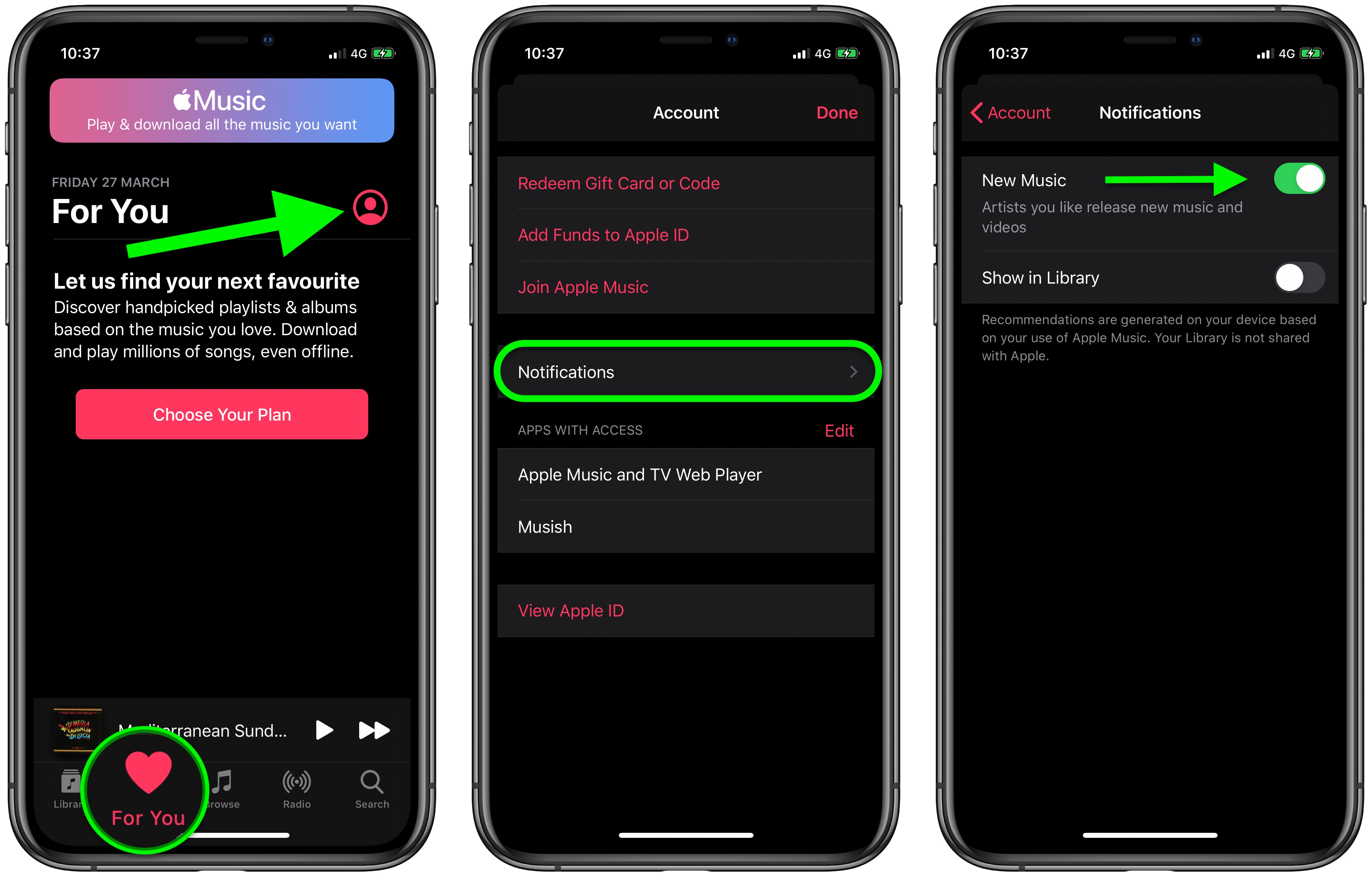
  1. Launch the Music app on your ‌iPhone‌ or ‌iPad‌.
  2. Select the For You tab.
  3. Tap Notifications.
  4. Toggle the switch next to New Music to suit your preference.

Apple Music
Alternatively, you can turn off all notifications from the Music app by launching the Settings app, selecting Notifications -> Music, and switching off the toggle next to Allow Notifications.
This article, "How to Enable or Disable Apple Music's New Release Alerts in iOS" first appeared on MacRumors.com

Discuss this article in our forums


from MacRumors: Mac News and Rumors - All Stories https://ift.tt/3dAgNVx

How to Turn Off Apple Music New Release Alerts in iOS

Apple on Thursday began rolling out a new Apple Music feature on iPhone and iPad that alerts users to new albums, EPs, and videos from artists included in their music library.

The alerts show at the top of the Library tab in the Music app, and given that they relate to content that's available in Apple Music, they're likely to be welcomed by most subscribers to the streaming service.

But even if you don't subscribe to ‌Apple Music‌, these alerts are still pushed by Apple to your device's Lock Screen and Notification Center, and may quickly be a cause of annoyance.

If that lines up with your experience, the steps below show you how to swiftly turn them off.
  1. Launch the Music app on your ‌iPhone‌ or ‌iPad‌.
  2. Select the For You tab.
  3. Tap Notifications.
  4. Turn off the switch next to New Music.

Apple Music
Alternatively, you can turn off all notifications from the Music app by launching the Settings app, selecting Notifications -> Music, and switching off the toggle next to Allow Notifications.
This article, "How to Turn Off Apple Music New Release Alerts in iOS" first appeared on MacRumors.com

Discuss this article in our forums


from MacRumors: Mac News and Rumors - All Stories https://ift.tt/2UkElWO